Your First Week, Done Right
An agent's usefulness is set in its first week — by the settings you flip and the habits you build. These twelve tips compress the trial-and-error.
Setup tips (day one)
| Connection | Default instinct | Our advice |
|---|---|---|
| Connect everything | Connect the main inbox; leave archives out | |
| Calendar | Full write access | Grant it — scheduling is Muse's best trick, review stays on |
| Payments | Skip until needed | Add when a task requires it; keep plan review mandatory |
| Health / smart home | Skip until needed | High-sensitivity, low-frequency — widen only with a standing use |
1. Grant narrow, widen later. Connect email and calendar first; add payments, health and shopping only when a task needs them. Permissions are easier to expand than to walk back.
2. Find the plan-review toggle. Set Muse to confirm before commitments — purchases, bookings, sends. This is the trust dial.
3. Set a notification budget. Approvals push; progress digests. Agents that ping every step get muted, and muted agents get forgotten.
4. Card on file ≠ free-for-all. The signup card enables the free tier; your paid tier is a separate choice. Check which one you are on before assuming spend.
Habit tips (days two to seven)
5. Phrase outcomes, not tasks. Constraints and done-conditions ("afternoons only", "under $40", "confirm before booking") turn vague agents into precise ones.
6. Start every category with a low-stakes job. First payments task: a subscription audit, not a purchase. First messaging task: a draft, not a send.
7. Keep a "done well / done wrong" note. Two columns; after each task, one line. Patterns appear by week's end — and they are exactly what you encode in better goal phrasing.
8. Use WhatsApp for the away hours. Start tasks from your phone; the shared allowance means the laptop session is the same agent.
9. Batch the boring recurring ones. Weekly renewal audit, Sunday planning sweep — recurring errands are where the free tier's allowance goes furthest.
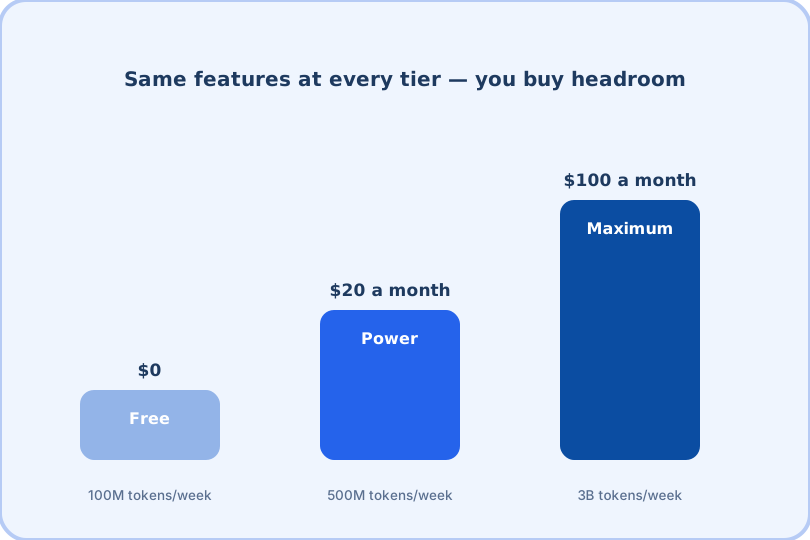
10. Watch the allowance clock. Free gives ~100M tokens a week; if you hit ceilings by Wednesday two weeks running, that is the ceiling test saying "Power".
11. Review connected-app scopes monthly. Agents accumulate permissions; a monthly two-minute audit keeps the blast radius small.
12. When it surprises you, ask why. The transcript of what it did is inspectable — reading one plan teaches you more about phrasing than any list (this one included).
A note on expectations
Muse in month two is genuinely capable and genuinely unfinished. Some errands will finish end-to-end and feel like magic; others will stall on a login, a weird form, or a merchant's bot — and need you to finish. The tips above are written for that reality: they build a workflow where the agent handles the repeatable 80% and you handle the interesting 20%, which is exactly the division it is built for.
Your first week at a glance
| Day | Focus | Win condition |
|---|---|---|
| Day 1 | Setup: narrow permissions, plan review on, notifications tuned | One tiny task finishes end-to-end |
| Days 2–3 | Scheduling and inbox triage — the zero-risk categories | First appointment booked without you chasing anyone |
| Days 4–5 | Research errands and the renewal audit | A comparison note you actually used to decide |
| Days 6–7 | Recurring sweep + WhatsApp away-hours habit | The free tier's allowance outlasting the week |
The one-sentence summary
Delegate the legwork, keep the approvals, and let the task list grow only as fast as your trust — that is the whole method.
Frequently asked questions
What is the single best tip?
Turn on plan review for anything touching money or commitments, and keep it on. The pause-to-confirm flow is where an agent earns trust — or loses it cheaply.
How do I phrase goals well?
Outcome, constraints, and what done looks like: "book a 40-minute dentist slot next week, afternoons only, and add drive time" beats "handle my dentist thing".
How do I stop Muse from being noisy?
Tune notification categories (approvals vs progress vs completions) and batch non-urgent updates to a daily digest time.